Device health, in context
Review CPU and memory usage, disk capacity and free space, online status and Windows services. Bring the device, its company and its assigned employee together in one workspace.

IT GENESIS ENDPOINT MANAGER
Know your devices. Support your people. Manage Windows device health, inventory and support across companies from one portal.
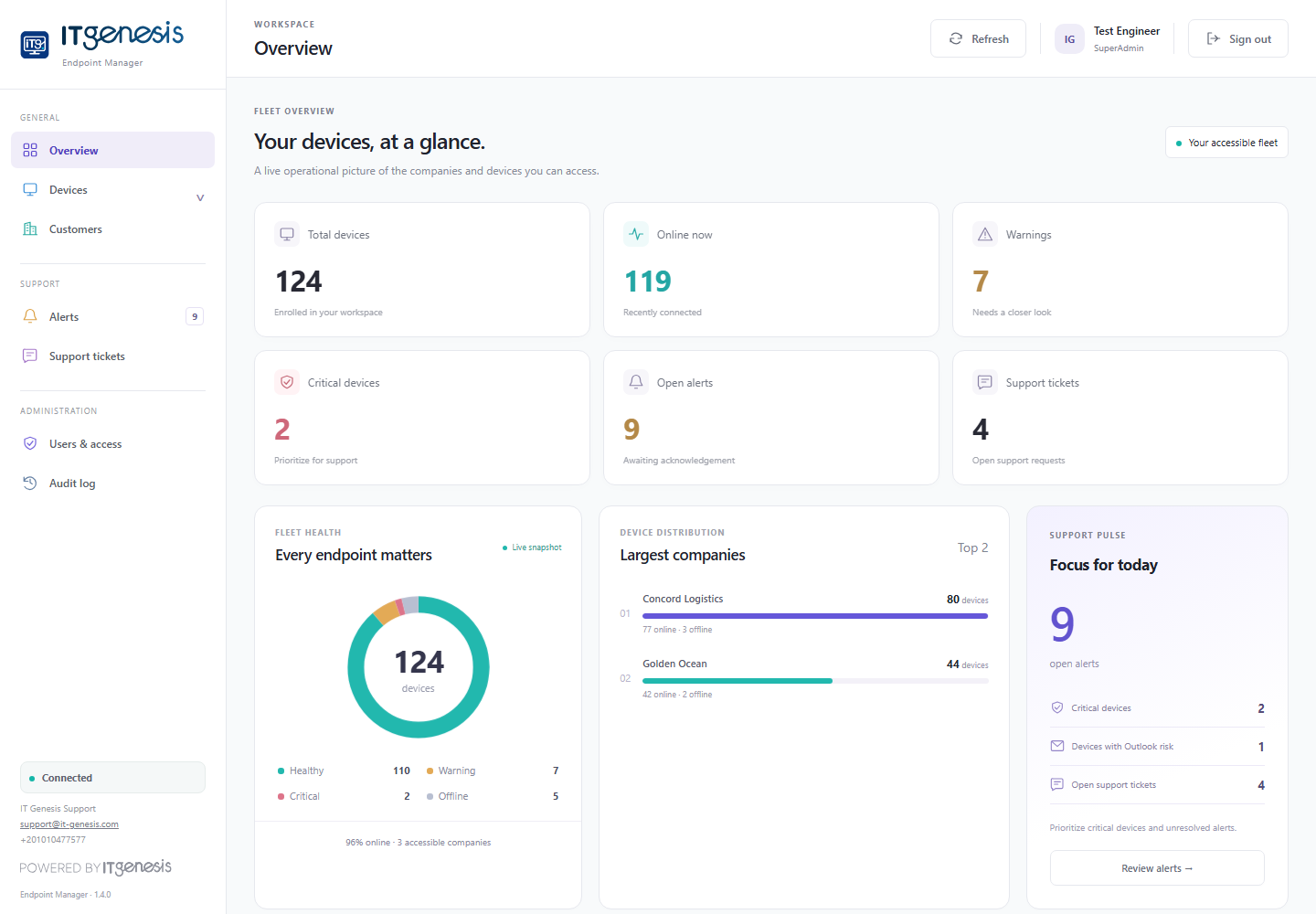
ONE WORKSPACE. CONNECTED INFORMATION.
IT Genesis Endpoint Manager brings Windows monitoring, IT asset inventory and support activity together. Engineers can move from a company overview to a device record, review the relevant information and work within the permissions assigned to them.
CAPABILITIES
Review CPU and memory usage, disk capacity and free space, online status and Windows services. Bring the device, its company and its assigned employee together in one workspace.
See hardware, operating system, IP and MAC addresses, and installed desktop software. Check classic Outlook accounts and local PST / OST file sizes, including archive files and unavailable paths.
Assign engineers to companies, include or exclude individual devices, and control Screenshots and Live View separately. Company viewer accounts are restricted to their assigned company.
Use scheduled screenshots and view-only live sessions when permission is granted. The employee sees a Monitoring Mode Enabled indicator; live viewing changes the indicator colour. Live View does not control the keyboard or mouse.
Bring device warnings, critical conditions and support tickets into the same portal. Review an endpoint before choosing an authorized service or power action.
The Windows agent runs as a service. Repair / Update retains the endpoint identity and settings, helping keep each device attached to its existing company and record.
ACCESS & PRIVACY
Monitoring is permission-based. Assign access to companies and devices, keep customer accounts within their own company, and make screen monitoring visible to the employee.
Understand how monitoring works ↓Company and device grants, explicit exclusions, and separate screen permissions.
Read-only access to their assigned company, with optional screen visibility controlled by an administrator.
A visible monitoring indicator, a desktop support application, and capture that requires an active, unlocked Windows session.
WHERE IT FITS
Keep device and employee records connected. Review health warnings and support requests in one place.
Organize endpoints by customer and allocate engineering access without exposing unrelated company data.
Give owners and managers a focused view of their own permitted devices and operational status.
PLATFORM AT A GLANCE
QUESTIONS, ANSWERED
Features described here reflect Endpoint Manager 1.7.0.
IT Genesis Endpoint Manager is a Windows endpoint monitoring and IT management platform. It combines a web portal, a Windows monitoring service and a desktop support application to help IT teams review device health, inventory, alerts and support requests.
Yes. Administrators can assign company and device access to engineers and exclude particular devices. A Company viewer account is bound to one company; wider group permissions cannot expose another company through that account.
No. Live View displays the active Windows session for authorized support staff. It does not send keyboard or mouse input. Access to Live View and stored screenshots is controlled separately from device management actions.
Screenshots require an active, unlocked Windows user session. Capture resumes after a restart when a user signs in and the monitoring components are running. Administrators control capture schedules and retention; the desktop displays a monitoring indicator.
The platform inventories classic Outlook profile information and local PST / OST file metadata, including size and availability. Local file sizes are not server mailbox quotas, and this feature is not email content inspection.
Yes. A company owner or manager can use a Company viewer account to review the assigned company’s permitted devices and status. Administrators may optionally grant screenshot viewing or Live View without granting device administration permissions.
The platform uses a Windows agent and desktop application, an ASP.NET Core portal on IIS, and Microsoft SQL Server. IT Genesis can review your Windows environment, hosting requirements and pilot rollout before deployment.
Contact IT Genesis at info@it-genesis.com or +20 10 1047 7577. Tell us about your companies, approximate endpoint count and support needs so we can discuss a suitable demonstration and deployment scope.
LET’S LOOK AT YOUR ENVIRONMENT
Tell us about your companies, devices and priorities.
We’ll discuss a demo and a practical pilot.